Sublime Text plugins
Sublime Text has been my editor for most of my working life. What follows is what I have written for it and published.
MarkdownPrettyPreview
A read-only preview of the Markdown file you are editing, opened in a sibling tab and redrawn as you type.
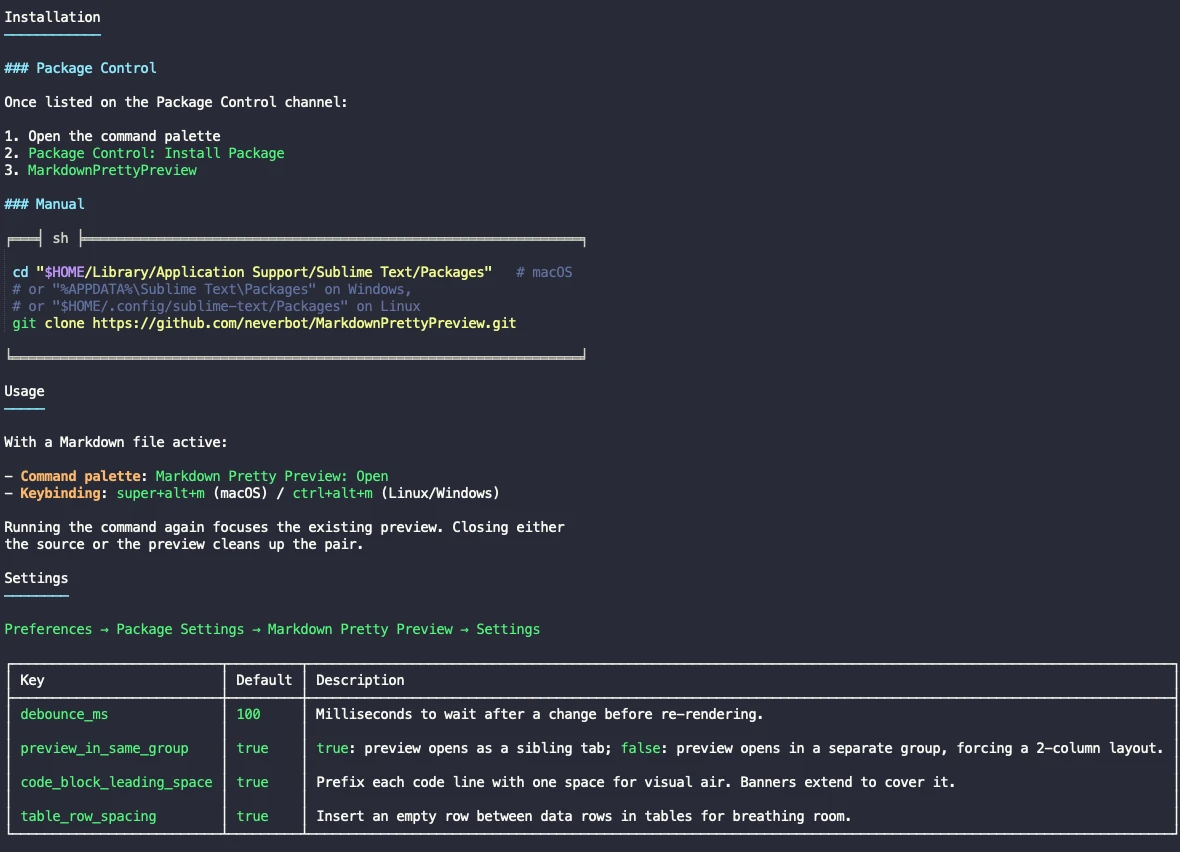
The preview of its own readme. Headings get rules, the table is drawn with box characters and wraps inside each cell, and the code block sits between banners that name its language.
Everything is drawn with text, because the preview is an ordinary Sublime
buffer. Headings get an underline, task lists become
▢ and ▣, blockquotes become a ▌ bar, tables are drawn with Unicode box
characters, wrapping and aligning each cell, and fenced code blocks are framed
between ╒═╡ lang ╞═╕ and ╘═══╛ with the syntax of the language still
highlighted inside.
Bold, italic and strikethrough are real styles rather than a change of colour. That needs zero-width Unicode sentinels marking each run, and they have a cost worth knowing: copy text out of the preview and the sentinels travel with it.
SublimerLog
Sublime does not promise an order when it loads plugins, so a plugin that throws while being imported can fail before anything is listening, and its traceback goes to a console nobody was watching. SublimerLog captures everything written to that console into a file, while still printing it, and can force a reload of the plugins you name once it is itself up, so their import-time errors land in the file too.
That turns a bug into something reproducible: start the editor, make it happen, read the file. It keeps a copy of the previous log on startup, and it is also what lets a coding agent read the console, which it otherwise cannot see, by leaving it on disk.